Request a demo

Gemstone Enterprise Management System

Inventory control for rough diamonds and gemstones.

Lucidus is the operational system of record for traders and manufacturers: every parcel, weight, price point, sale and shipment in one place, with a complete history from goods receipt to invoice.

  • Lightweight browser application, mobile ready
  • Secure authentication including MFA
  • Scales and label printers connected
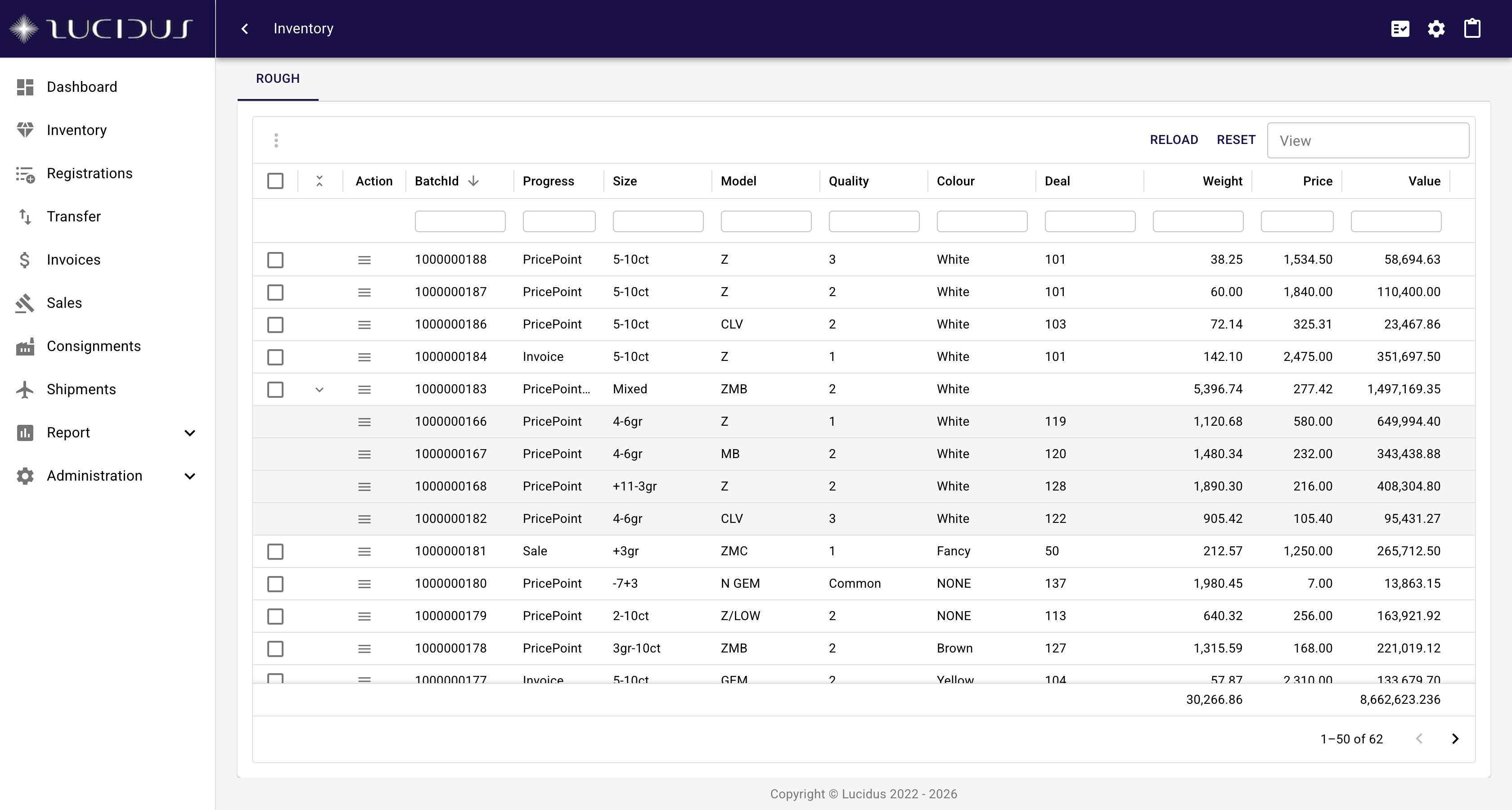
The Lucidus inventory view with a box expanded to show its underlying parcels, each with size, model, quality, deal, weight and price

Parcel-level stock

Every parcel with weight, price, deal, location and status in one view.

Complete lineage

Splits, mixes, boxes and transfers form a family tree that is never edited.

Scales and printers

Live weights from the balance, labels on the printer next to it.

Your company accounts

Secure authentication including MFA, integrated with your company account management, for example Microsoft Entra ID.

Modules

From goods receipt to invoice, one record of the goods.

Lucidus follows the physical goods. Each module is a step in their life, and every step writes to the same parcel history.

Inventory

Your inventory, parcel by parcel

One central view of the whole stock. Every parcel carries its weight, price, deal, location, attributes and status, and every operation on the goods starts from here.

  • Box and unbox, group and ungroup, split and mix parcels without losing their lineage
  • Valuation and sorting built in, from price-point splits to the cut-off process for bulk goods
  • Check-in and check-out, check weights with tolerance thresholds and approvals
  • Label printing, Excel export and saved views per user
More about your inventory, parcel by parcel
The Lucidus inventory view with a box expanded to show its underlying parcels, each with size, model, quality, deal, weight and price

Traceability

Parcel genealogy and history

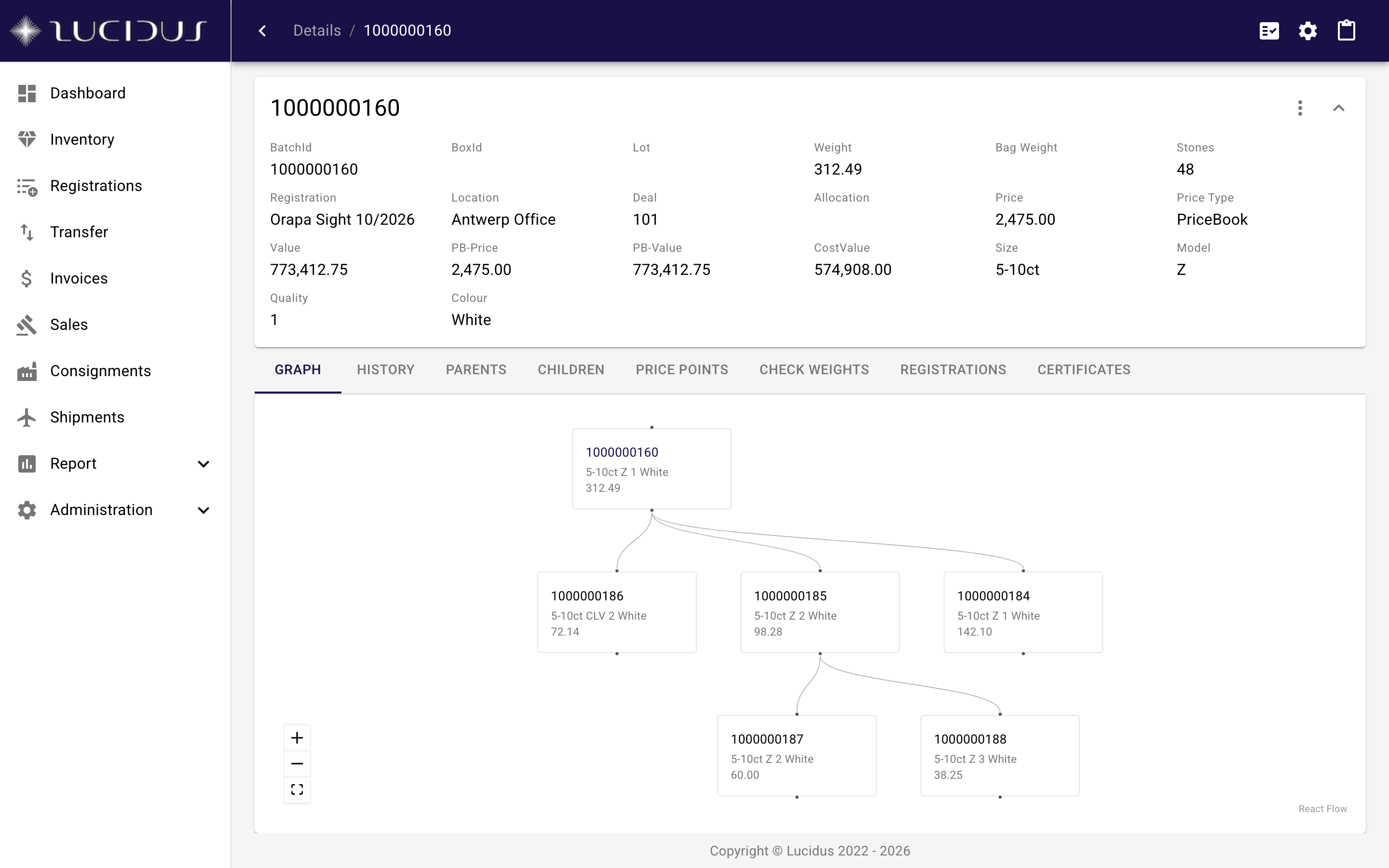
Every split, mix, box and transfer is a node in the parcel's family tree. Parents, children, price points, certificates and registrations stay linked, and the change history is complete and append-only.

  • Family-tree view from the original registration down to the last remaining stone
  • Full change history on every parcel, written by the system and never edited
  • Parents, children, price points, check weights, certificates and registrations on one screen
  • Provenance follows the goods from goods receipt through every operation
More about parcel genealogy and history
Parcel details with the family tree of a parcel split into three price points and re-split again

Procurement

Goods receipt and registrations

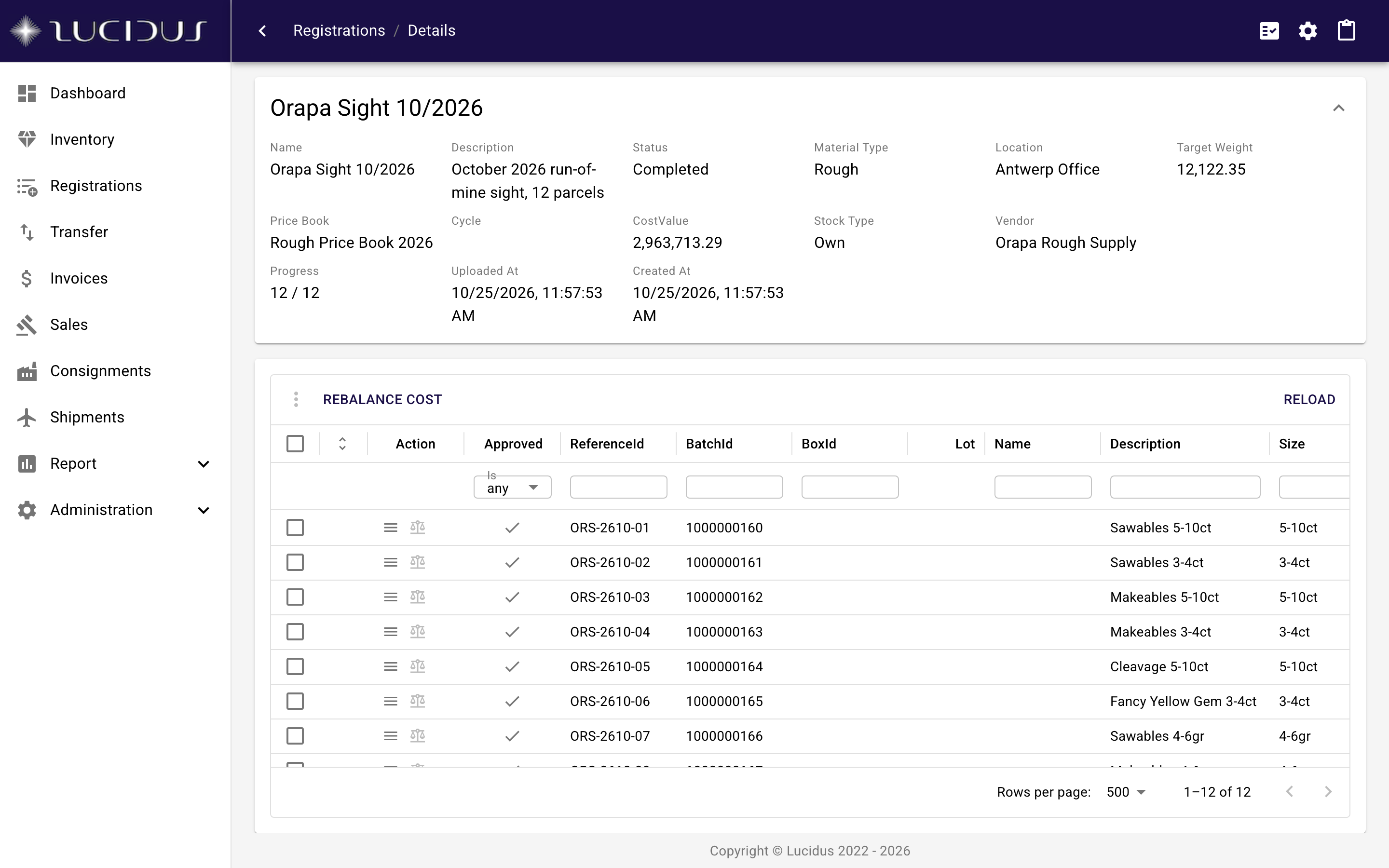
Register incoming goods against the supplier's documents, receive them by weighing each item, approve in a controlled step and distribute the cost across the resulting parcels according to their value.

  • Registration items with declared weight, cost and attributes per line
  • Receive by weighing every underlying item, or approve on the declared values
  • Cost balancing spreads the registration's cost across its parcels by value after valuation and sorting
  • Linked to the vendor, the shipment and every parcel created from the registration
More about goods receipt and registrations
A completed registration of a sight with twelve received items, their reference ids, weights and descriptions

Sales

Sales, tenders and auction platforms

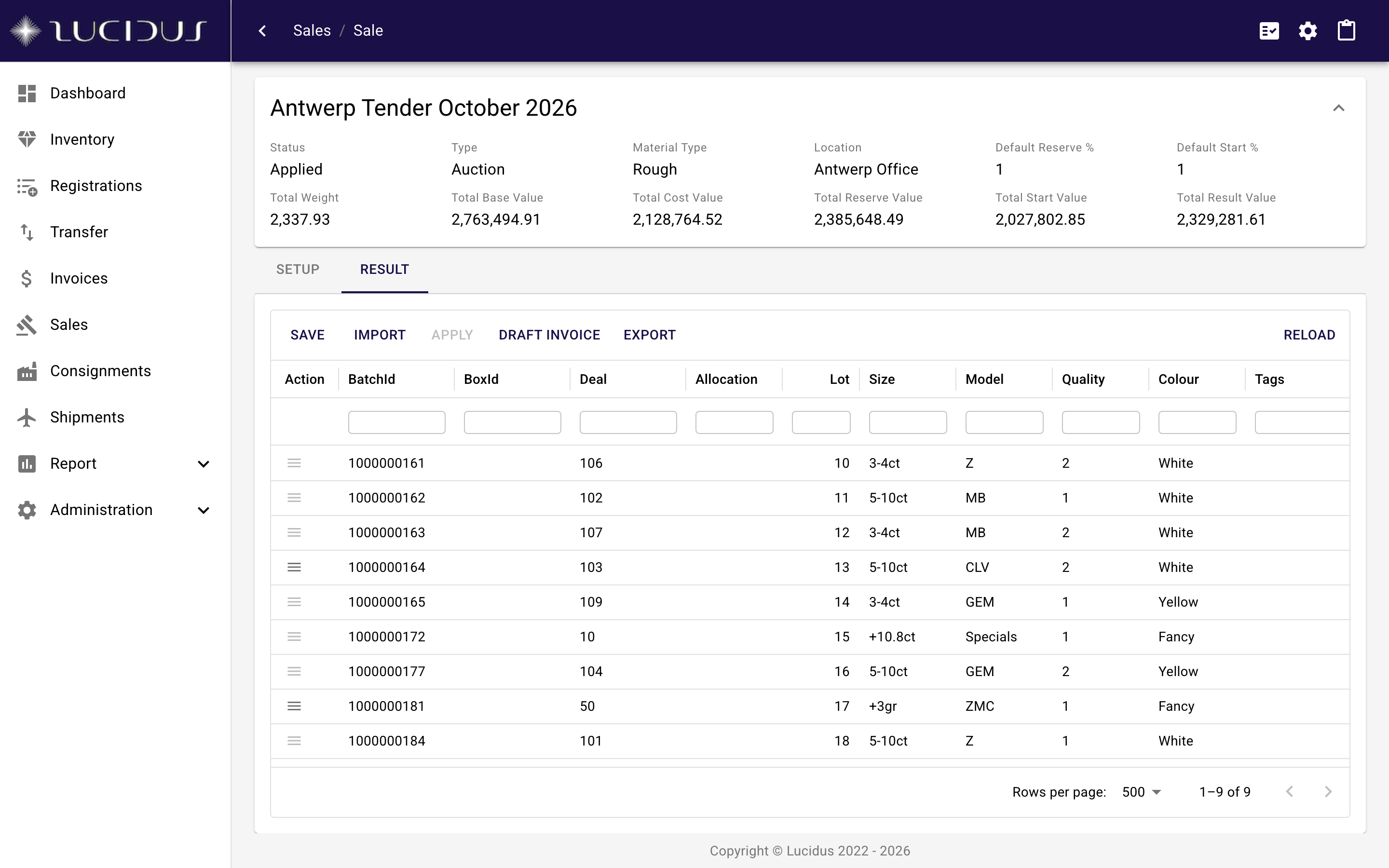
Set up a sale from the stock, hand goods to a partner-operated auction or tender platform, import the results, update the price book from them and turn them into draft invoices in one step.

  • Sale setup from selected parcels or boxes, with reserve and listing data
  • Results import from partner-operated auction and tender platforms
  • Price book updated from the achieved prices, so the next valuation reflects the market
  • Draft invoices generated from the results, ready for review
  • Unsold goods return to stock with their history intact
More about sales, tenders and auction platforms
Result tab of a tender sale with lots, prices and the buttons to import results and draft invoices

Billing

Invoices and PDF templates

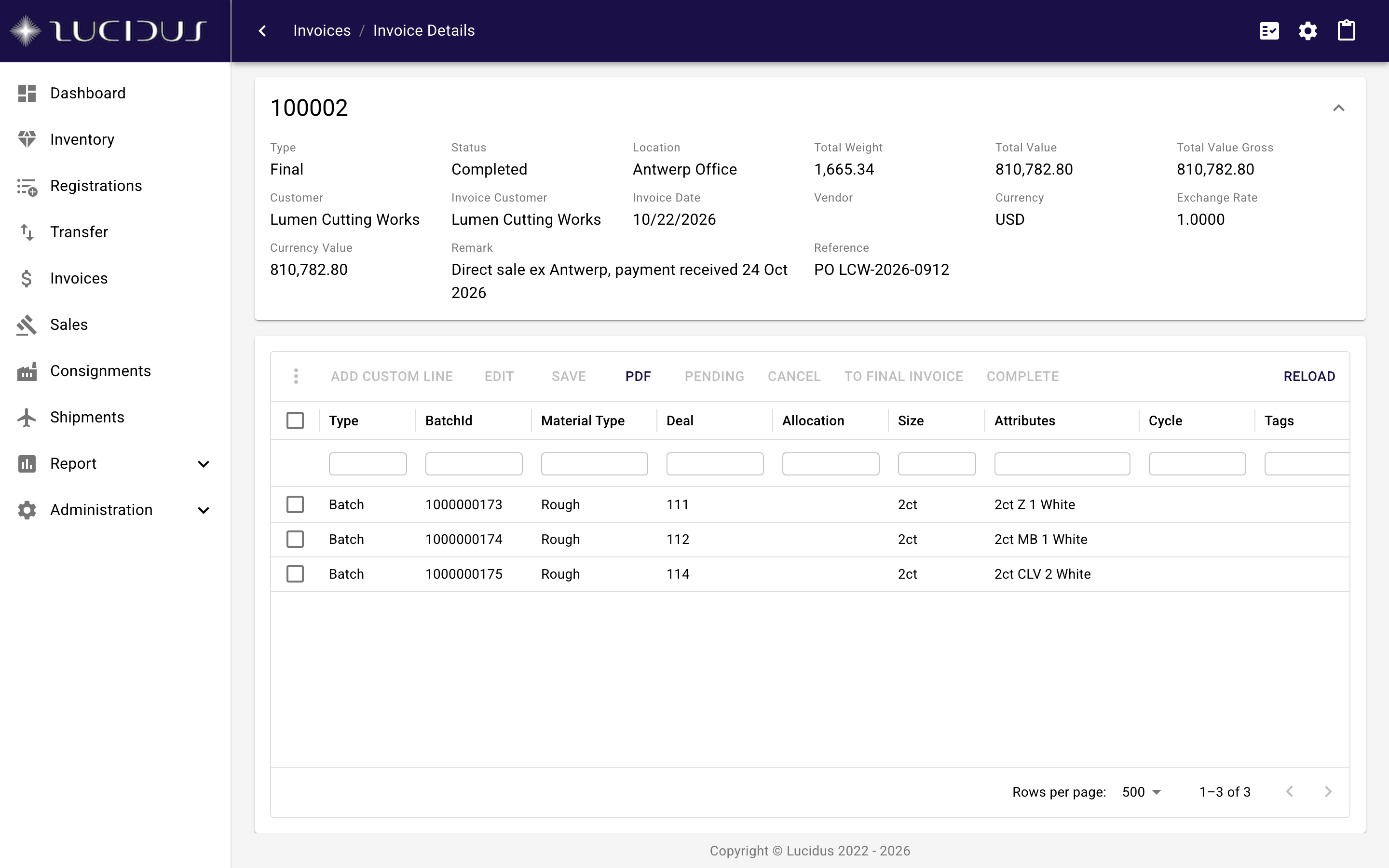
Invoices built from parcels in the inventory or from custom line items, with PDF output rendered from fully customizable templates.

  • Add parcels from the inventory or the clipboard, or add custom invoice line items
  • PDF rendered server-side from fully customizable templates with logo and terms
  • Status flow from draft to completed, linked to the parcels it bills
More about invoices and pdf templates
A completed invoice with three parcels, totals and the PDF action

Logistics

Consignments and shipments

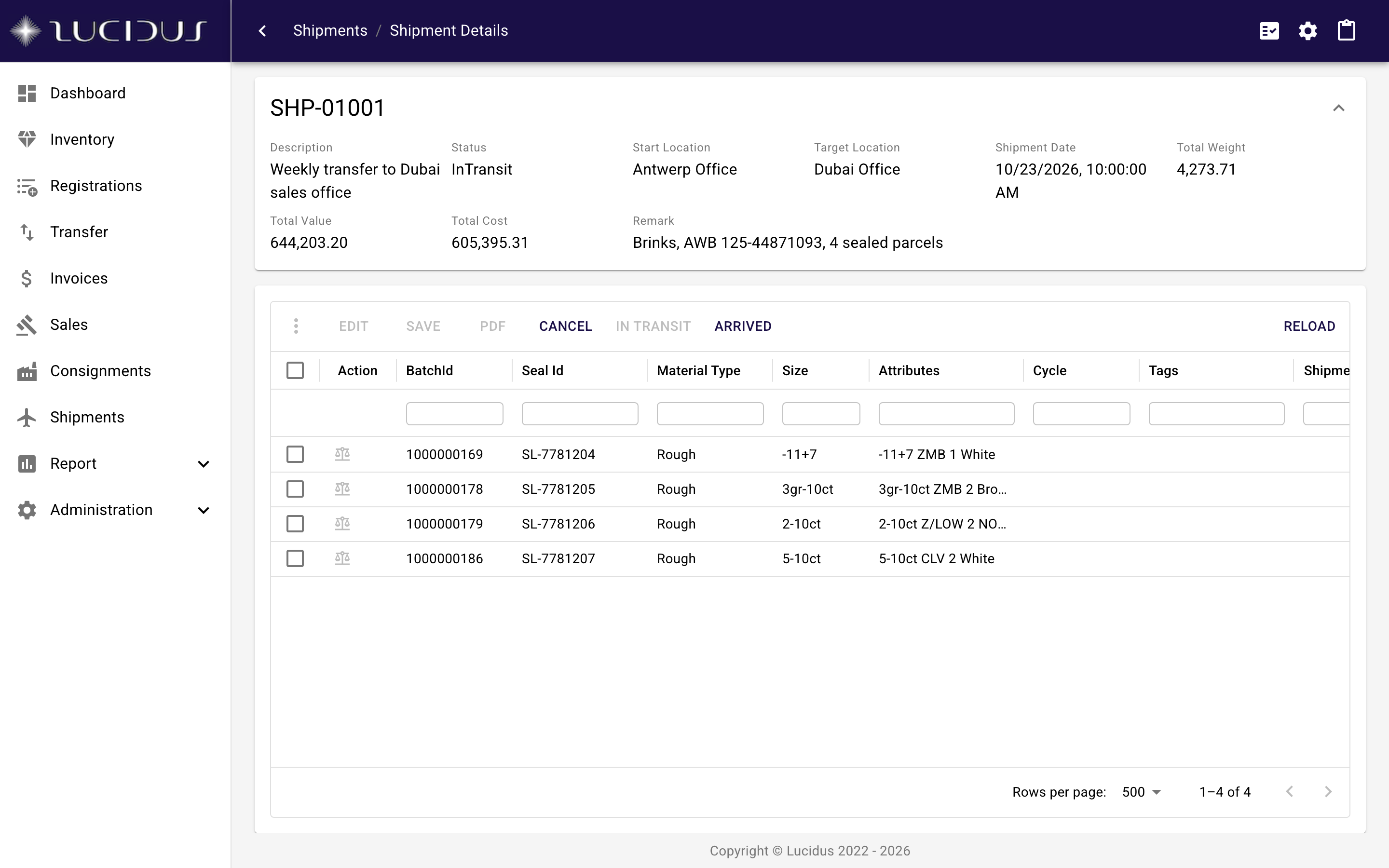
Track goods that are out on consignment and goods that are in transit between locations. Shipments are received by group or by item, with weights checked on arrival.

  • Consignments with the partner, the goods and the return or sale of each parcel
  • Shipments between your own locations with status from created to received
  • Receive by group or by item, weighing on arrival with the connected scale
  • Goods in a shipment are locked against other operations until they arrive
More about consignments and shipments
A shipment in transit from Antwerp to Dubai with four sealed parcels

Workstation

Weigh and print without leaving the browser.

A small background agent connects the balance and the label printer on each desk to Lucidus. Weights arrive in the form as they settle on the scale; labels come out of the printer next to it.

Scales over TCP/IP

The Workstation agent reads precision balances that speak the Mettler-Toledo SICS or Sartorius SBI protocol and hands the live weight to the browser. Manual entry remains available as a fallback.

Label printers through the user's queue

Labels are rendered as PDF on the server and spooled by the agent to the printers installed for the signed-in user, at actual size and with the paper settings of that queue. Windows and macOS are supported.

Installed from the app, updates itself

The agent is downloaded from the settings page of Lucidus, installs per user without administrator rights, registers for autostart and checks for updates on its own. Print jobs take seconds, so an update restart goes unnoticed.

Platform

Built for companies that are audited.

Identity, authorization and a complete history are part of the foundation, not features bolted on later.

Secure sign-in with your company accounts

State-of-the-art authentication including multi-factor authentication, integrated with the account management your company already runs, for example Microsoft Entra ID. No separate passwords to manage, and leavers lose access the moment their company account is closed.

Roles and permissions in the application

Who may do what is defined in Lucidus. Roles bundle granular permissions for the activities of the business, from viewing stock to approving check weights or completing invoices, and users hold one or more roles.

Complete change history

Every change to a batch, registration, invoice, sale or master-data record is written to an append-only history with user and timestamp. The genealogy of goods is derived from the same records, so audits start from data rather than from recollection.

Lightweight browser application, mobile ready

Lucidus runs in current browsers on desktop and mobile devices. Views with thousands of parcels, server-side paging and filtering, and saved views per user keep it fast on everyday hardware; only the optional Workstation agent for scales and printers is installed locally.

Modern, cloud-native platform

Built on a current, actively maintained technology stack and operated as a cloud service, with embedded reporting on live data and a data region agreed per customer.

Questions

Common questions, short answers.

Which browsers and devices does Lucidus run on?

Lucidus is a lightweight web application and runs in current versions of Chrome, Edge, Firefox and Safari on Windows and macOS, and on tablets and phones for viewing and quick checks. Daily operations are designed for a desktop with a keyboard and, usually, a scale and a label printer.

Do I need to install anything?

Only if you want to connect a scale or a label printer. The optional Workstation agent is a small background program for Windows and macOS that reads the connected scale and prints labels on the printers of the signed-in user. It installs without administrator rights, is downloaded from inside Lucidus and updates itself.

Can my team use their existing company accounts?

Yes. Lucidus integrates with your company’s account management, for example Microsoft Entra ID, so the accounts, passwords, multi-factor authentication and access policies you already manage apply. Who may do what inside Lucidus is defined by roles and permissions in the application. Other identity providers can be connected on request.

Which scales and printers are supported?

Scales that speak the Mettler-Toledo SICS or the Sartorius SBI protocol over TCP/IP are supported out of the box; that covers most precision balances used in the trade. Labels are rendered as PDF on the server and printed on any printer installed on the workstation, which includes the usual thermal label printers. Other protocols can be added through the agent’s device layer.

Can we import our existing stock?

Yes. The transfer import accepts spreadsheet-style data for groups, boxes and individual weights, validates it against your material types, deals and attributes and creates the batches in bulk. Master data such as deals, companies and attributes can be uploaded in bulk as well. A typical migration starts with the master data, then the open stock, then the live operations.

Can invoices and labels carry our own layout?

Yes. Invoices, labels and other printouts are rendered from HTML templates that belong to your company. Logo, address block, terms, fonts and column layout are part of the template and can be changed without a software release.

Next step

See Lucidus on your goods.

A walkthrough takes an hour. Bring a sight, a tender result or a spreadsheet of open stock and we show how it looks as batches, registrations and a sale.